

AI data extraction is becoming one of the most practical ways to turn messy business information into decisions leaders can actually use. Every growing company collects useful signals every day, yet much of that information sits inside emails, PDFs, support tickets, call notes, proposals, invoices, reviews, contracts, chat logs, and meeting transcripts. Because these sources do not arrive in neat rows and columns, teams often miss patterns until a problem becomes expensive. However, AI can read, classify, summarize, compare, and structure this information far faster than manual review.
For many businesses, the challenge is not a lack of data. Instead, the problem is that the best data is unstructured. A customer may explain a buying objection in a sales call. Supplier messages may mention a risk inside a PDF. Long client email threads may describe a service issue before it reaches a dashboard. When those details stay buried, managers rely on guesses. With the right workflow, AI data extraction turns those hidden details into searchable records, dashboards, alerts, and next-best actions.

What Unstructured Data Means for Business
Unstructured data is information that does not follow a fixed database format. It may include text, images, scanned documents, audio, video, and mixed files. Although this content is harder to analyze than spreadsheet data, it often contains the strongest clues about customer behavior, operational delays, sales friction, compliance gaps, and market demand.
Consider a service company with thousands of customer messages. A simple report might show response time and ticket volume. Meanwhile, the actual messages reveal why customers are frustrated, which promises are unclear, and where staff need better information. In the same way, contracts may reveal recurring negotiation delays, invoices may show approval bottlenecks, and call transcripts may expose common objections. AI helps extract those signals without forcing employees to read every file line by line.
How AI Data Extraction Works
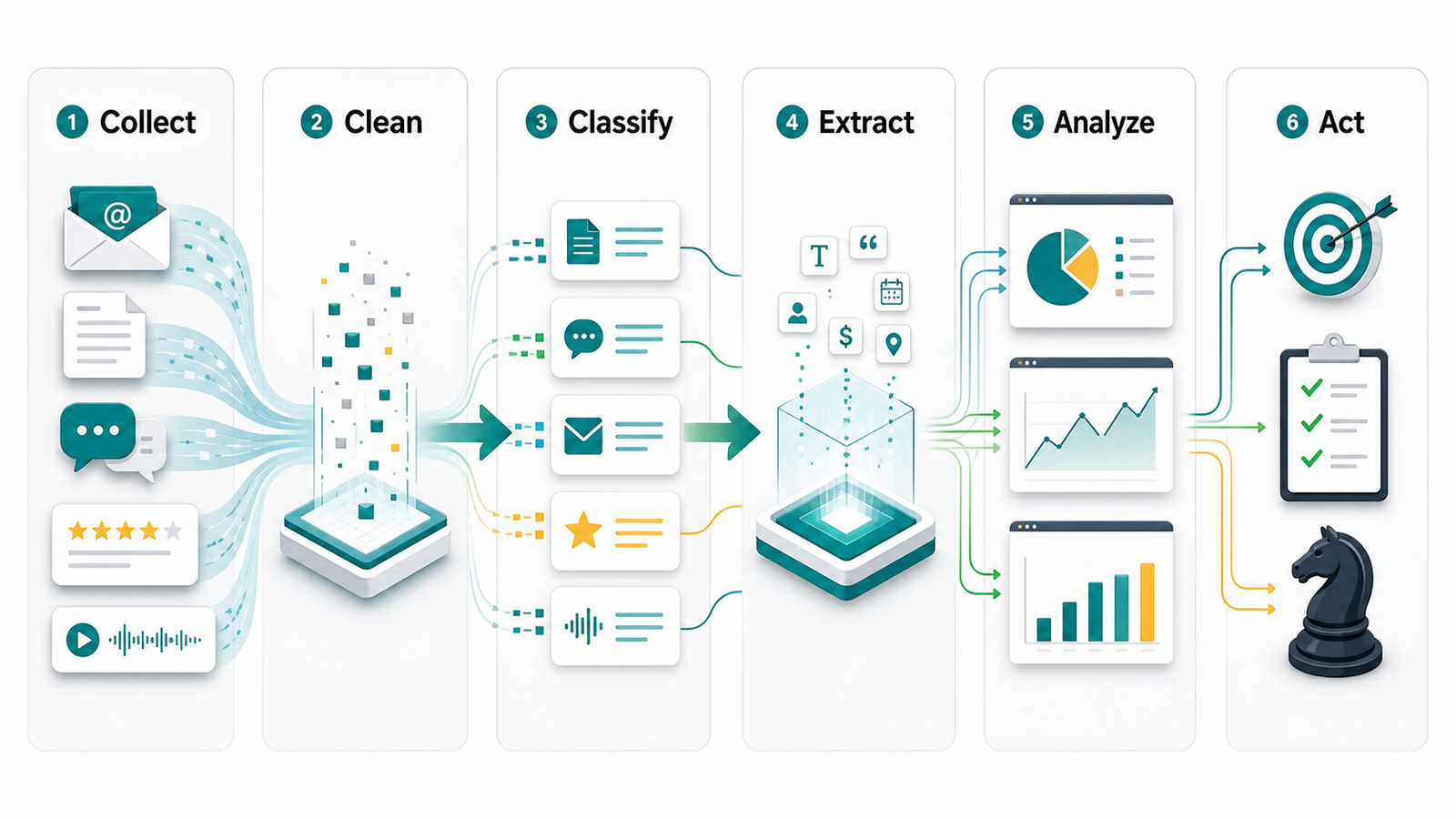
AI data extraction combines several technologies. Optical character recognition can convert scanned pages into text. Natural language processing can identify entities, topics, intent, sentiment, dates, names, amounts, and action items. Large language models can summarize long documents, compare records, explain changes, and convert text into structured fields. Together, these capabilities help businesses move from raw content to organized insight.
The workflow usually starts by collecting content from connected systems. After that, AI cleans the input, removes duplicate noise, classifies each item, and extracts the fields that matter. Then the system validates important details against business rules or trusted databases. Finally, the extracted information flows into a CRM, dashboard, spreadsheet, ticketing tool, accounting system, or automation platform.
Why Traditional Reporting Misses Important Signals
Traditional reporting works well when data is already structured. For example, it can show revenue by month, leads by source, or open tickets by team. Yet it struggles when the business question depends on context. A report may show that churn increased, but customer emails may explain the reasons. A sales dashboard may show lost deals, while call notes reveal the objections behind those losses.
As a result, companies often make decisions from partial evidence. They know what happened, but they do not always know why it happened. AI closes that gap by reading the supporting material around the numbers. Consequently, leaders can connect the measurable outcome with the language, documents, and conversations that shaped it.
Common Sources AI Can Analyze
Most businesses already have several valuable sources ready for analysis. Customer emails can reveal service expectations, recurring complaints, renewal risks, and upsell opportunities. Sales call transcripts can highlight objections, competitor mentions, pricing questions, and buying intent. Support tickets can show product confusion, training needs, and broken processes. Reviews and survey responses can uncover brand perception in the customer’s own words.
Documents are equally useful. Proposals, contracts, statements of work, invoices, purchase orders, insurance forms, medical forms, applications, and onboarding packets all contain decision-making details. Additionally, internal chat logs and meeting summaries can expose project blockers, delayed approvals, and unanswered questions. When these sources are connected responsibly, AI data extraction can create a much clearer view of the business.
Raw Review vs AI Data Extraction
| Business task | Manual review | AI data extraction |
|---|---|---|
| Reading customer messages | Slow, inconsistent, and limited by staff availability | Fast classification of topics, sentiment, urgency, and next steps |
| Processing documents | Requires repeated copying, checking, and filing | Extracts names, dates, amounts, clauses, and exceptions into fields |
| Finding trends | Often depends on anecdotal feedback | Groups patterns across thousands of records and highlights changes |
| Routing work | Employees decide where each item should go | Automatically sends items to the right team or workflow |
| Management reporting | Shows what was manually entered into systems | Adds context from the conversations and documents behind the numbers |
This comparison does not mean people become unnecessary. On the contrary, AI works best when it handles repetitive extraction while employees review exceptions, make judgment calls, and improve the process. Therefore, the goal is better visibility and faster action, not blind automation.
Business Insights AI Can Extract
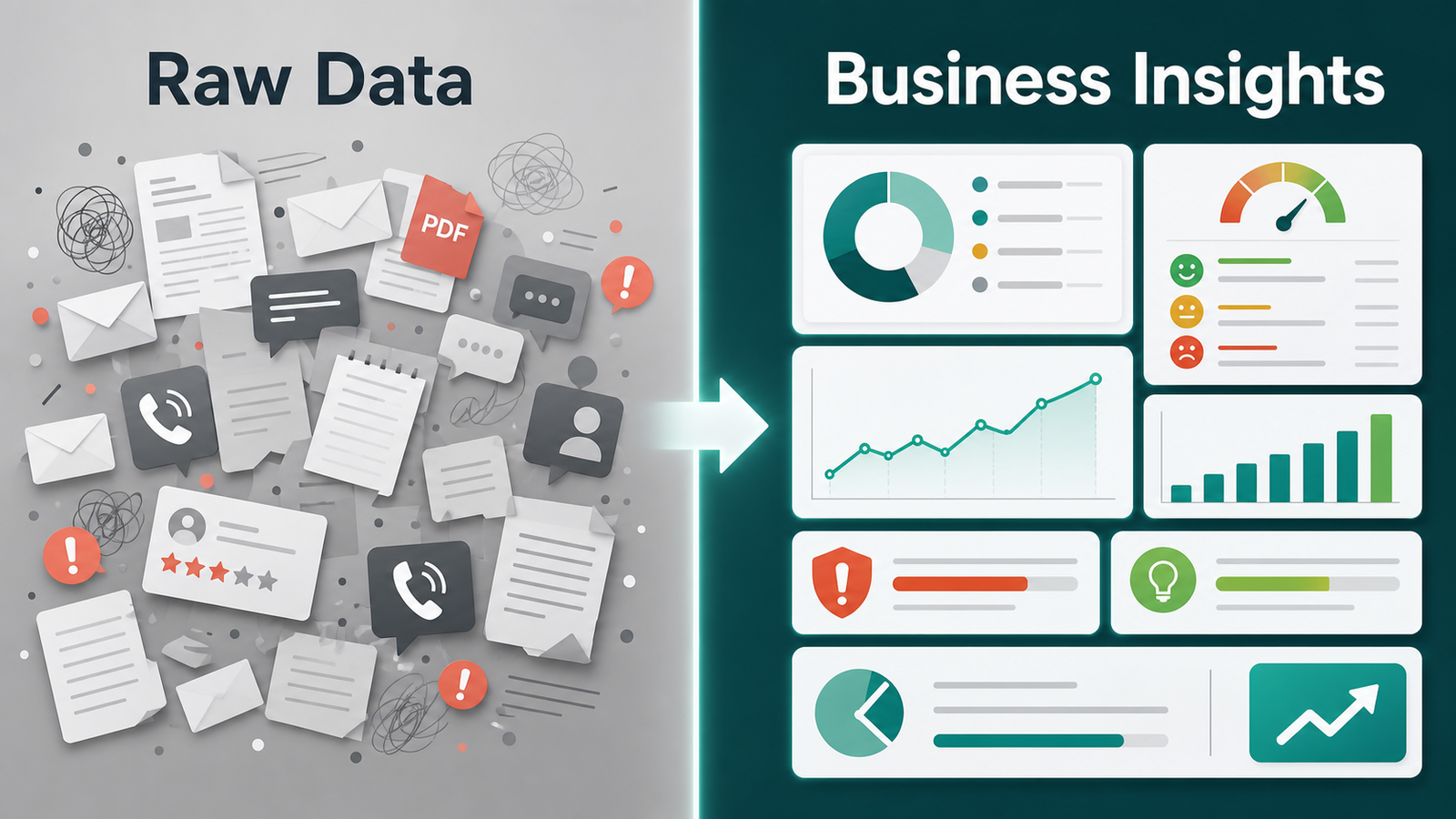
Useful extraction goes beyond pulling names and dates from documents. For sales teams, AI can identify lead intent, budget signals, objections, competitor mentions, buying committees, and follow-up tasks. Support teams can detect customer frustration, unresolved issues, escalation risk, and common knowledge-base gaps. Operations leaders can surface vendor delays, approval bottlenecks, missing forms, and recurring process exceptions.
Financial teams can also benefit. AI can extract invoice line items, payment terms, tax details, contract renewal dates, and unusual charges. Meanwhile, leadership teams can use extracted themes to understand market demand, customer expectations, employee workload, and risk trends. As the system improves, these insights become part of routine decision-making rather than occasional research projects.
Where Connected Workflows Matter
Extraction alone is only the first layer. The real value appears when insights move into the systems where work happens. For example, a high-intent email can create a CRM task. A risky support message can alert a manager. Renewal dates can trigger a follow-up sequence. Scanned forms can update a customer profile after human review.
Businesses that want this type of connected workflow can start by mapping their current processes. Zevanta Digital’s AI automation services help teams identify where AI should extract, validate, and route information. The implementation process also helps clarify which data sources should be connected first. For broader support, the services page explains how automation, workflow design, and AI systems can work together.
Independent technology providers describe similar patterns. Microsoft Azure AI Search explains how search systems can enrich and index varied content. Google Cloud Document AI focuses on extracting structured data from documents. In addition, AWS outlines why unstructured data needs specialized handling, while IBM describes the business importance of unstructured information.
Step-by-Step Guide to AI Data Extraction
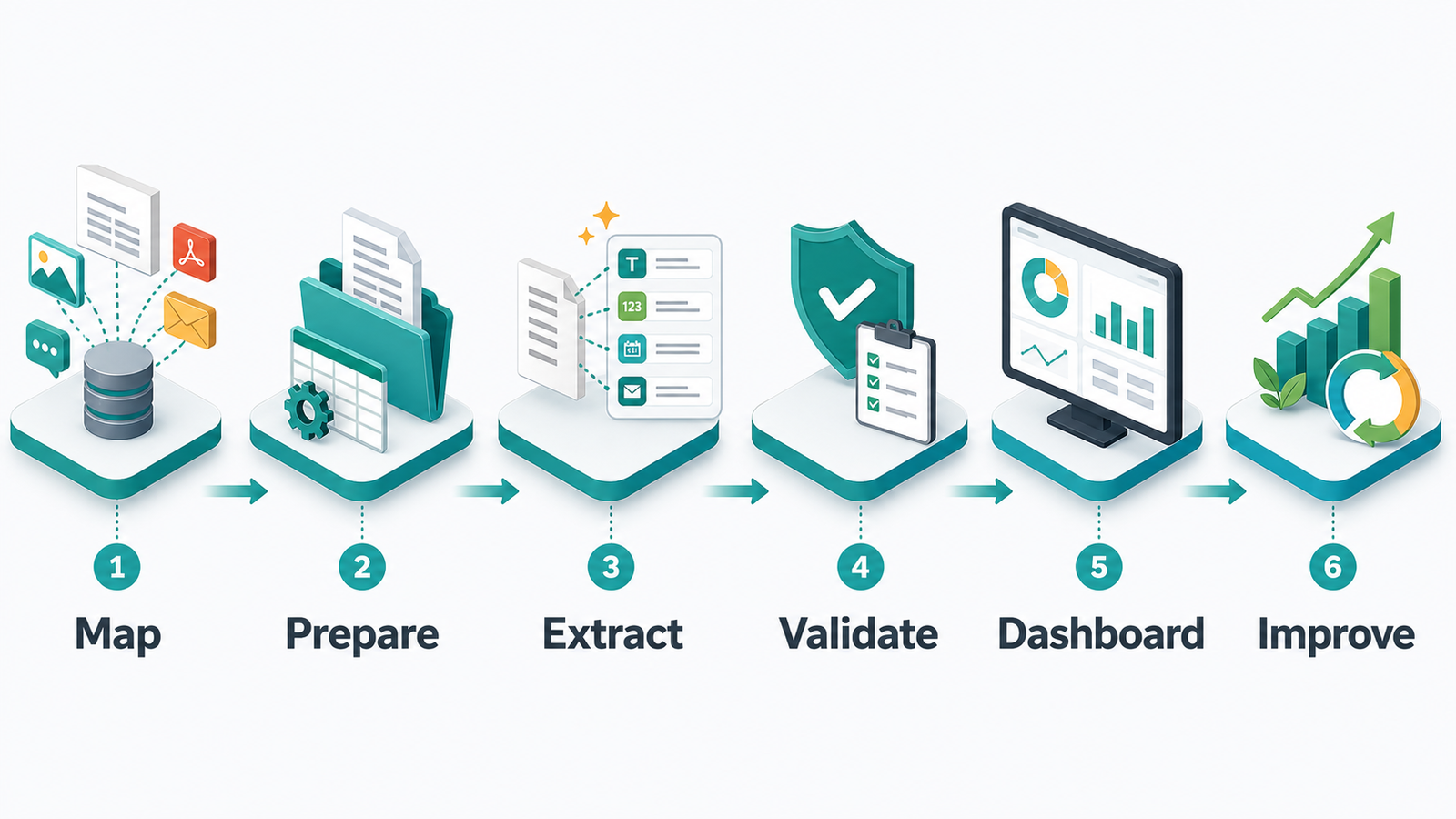
Step 1: Choose one high-value use case. Begin with a workflow where the data is frequent, repetitive, and tied to a business outcome. Good starting points include lead qualification emails, invoice processing, support ticket triage, contract review, onboarding documents, or customer feedback analysis.
Step 2: Define the exact fields and insights needed. Instead of asking AI to “analyze everything,” list the specific outputs. These may include customer name, company, urgency, product mentioned, contract date, payment amount, topic, sentiment, objection, risk level, or recommended action.
Step 3: Prepare sample data. Collect real examples from the workflow, including clean cases and messy exceptions. Then remove sensitive information when needed. A strong sample set helps the AI workflow handle real business variation, not just perfect test documents.
Step 4: Build the extraction logic. Depending on the source, this may include OCR, document parsing, language model prompts, rules, validation checks, and confidence scoring. Moreover, the system should flag uncertain results instead of pretending every answer is correct.
Step 5: Connect the output to business tools. Extracted data should land where teams can use it. That may be a CRM, help desk, project management tool, accounting platform, database, dashboard, or approval queue.
Step 6: Add human review for sensitive decisions. AI can assist with classification and recommendations, but important legal, financial, medical, employment, or customer-impacting decisions should include review. This keeps the workflow useful and responsible.
Step 7: Measure and improve. Track time saved, error reduction, faster response times, better routing, increased conversion, lower backlog, and improved customer satisfaction. Afterward, use those results to decide which workflow should be automated next.
Benefits for Growing Businesses
The first benefit is speed. Teams can process large volumes of documents and messages without waiting for manual review. The second benefit is consistency. AI can apply the same classification rules across every record, which reduces random judgment differences between employees. Another benefit is visibility, because leaders gain access to trends that were previously hidden in text and files.
Better extraction also improves customer experience. When AI recognizes urgency, routes requests correctly, and summarizes history for staff, customers get faster answers. Furthermore, sales teams can prioritize prospects with stronger buying signals. Operations teams can find blockers earlier. Finance teams can reduce repetitive data entry. Over time, these improvements can create a measurable lift in productivity and decision quality.
Common Mistakes to Avoid
One common mistake is starting too broadly. A company may try to analyze every document and conversation at once, then struggle to prove value. A better approach is to begin with one workflow and a clear success metric. Another mistake is ignoring data quality. If source files are incomplete, duplicated, or poorly labeled, the system needs cleanup and validation rules.
Some teams also forget about privacy and access control. Sensitive documents should only be processed through approved systems with the right permissions. Likewise, extracted insights should not be visible to every employee by default. Finally, businesses should avoid treating AI results as perfect. Confidence scores, audit trails, and human review steps are essential when the outcome matters.
How Zevanta Digital Helps Your Business
Zevanta Digital helps businesses turn unstructured information into practical workflows. First, the team reviews where documents, emails, calls, forms, and support messages slow down operations. Next, the most valuable use cases are prioritized based on business impact, implementation difficulty, and available data quality. After that, AI extraction workflows can be designed to classify information, pull key fields, summarize context, and route the output to the right tools.
This approach is useful for companies that want automation without losing control. Instead of replacing judgment, Zevanta Digital can help design review checkpoints, exception queues, and reporting dashboards. As a result, teams gain faster insight while keeping sensitive decisions accountable. Businesses can also review case studies or use the contact page to discuss where AI data extraction could create the fastest operational improvement.
What to Measure After Launch
Measurement keeps the project grounded. Useful metrics include documents processed per hour, manual review time saved, extraction accuracy, exception rate, routing accuracy, customer response time, revenue influenced, and backlog reduction. In addition, leaders should measure whether employees trust the output and whether managers are using the insights in real decisions.
Once the first workflow proves value, the same pattern can expand. For instance, a company may start with invoice extraction, then move into contract renewals, support trends, and sales call analysis. Gradual expansion is usually more effective than launching a complex system across every department at once.
Frequently Asked Questions
What is AI data extraction?
AI data extraction uses artificial intelligence to pull useful information from documents, emails, chats, calls, forms, reviews, and other unstructured sources. It converts that information into structured fields, summaries, alerts, or workflow actions.
Why is unstructured data hard to analyze?
Unstructured data does not follow a fixed format. Because every message, file, or transcript may look different, traditional reporting tools cannot easily compare it without extraction, classification, and context analysis.
Which business teams benefit most from AI data extraction?
Sales, support, operations, finance, legal, HR, and leadership teams can benefit. The strongest use cases usually involve repeated documents or messages that contain important decisions, risks, requests, or customer signals.
Can AI extraction connect with my CRM or help desk?
Yes. Extracted data can flow into CRMs, help desks, spreadsheets, dashboards, accounting systems, project tools, or databases through integrations. However, the workflow should include validation and review rules where accuracy matters.
Is AI data extraction accurate enough for business use?
Accuracy depends on source quality, workflow design, validation rules, and the complexity of the task. Many businesses use AI confidently for classification, summarization, routing, and first-pass extraction while keeping human review for exceptions.
How should a company start with AI data extraction?
Start with one high-volume workflow that has a clear business outcome. Define the fields needed, test with real examples, add confidence checks, connect the output to daily tools, and measure results before expanding.
How can Zevanta Digital help my business?
Zevanta Digital can help identify the best extraction use cases, design responsible AI workflows, connect data sources, add review steps, and turn extracted insights into useful dashboards, alerts, and automations.